
AccountKit v3.0
With AI, turning an idea into something real and shipping it faster is what most product teams now hope for. Over six months I built the design system, designed the product and set up a way of working with Claude Code, so that the CEO, not only me, could build a prototype to show the team an idea.
AccountKit is a SaaS company for accounting firms in Australia. Its CEO set the team a clear expectation: use AI to get the product to customers faster. When I looked at how we worked, the slowest part was not development. It was the design process. The CEO had the ideas but could only describe them in meetings, and then waited a long time for the PO, BA and designer to turn them into a design prototype worth reviewing. So what I proposed was to give the people with the ideas a way to show them themselves, as a running prototype instead of a Figma file I had drawn.
No code until the design is done
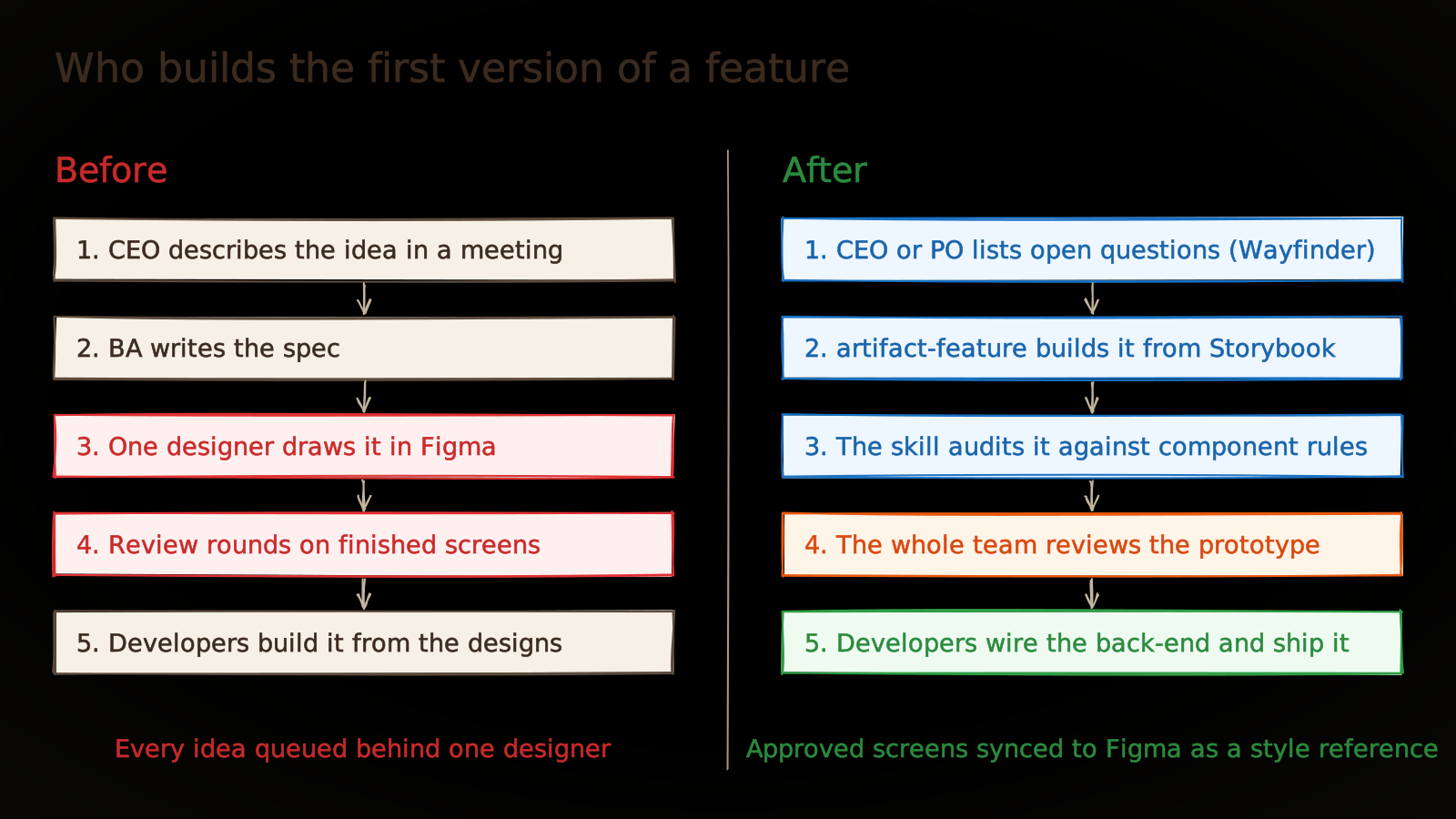
A feature used to start in a meeting. The CEO described the idea, the BA wrote it up as a spec, and I drew it in Figma from that spec. Each handover bent the CEO’s idea a little, and sometimes the BA and I understood it in two different ways. Only when I had finished drawing could anyone tell whether we were all talking about the same thing.
The CEO and PO did not use Figma, so they had no way to sketch what they meant. All they could do was wait for my screens and react to them. Every feature went through rounds of approval and feedback before a developer could start. Without anyone intending it, design became the bottleneck for the whole team, and that is the stage where everyone wanted to try AI first.
Giving the idea back to the person who had it
I wanted to cut those handovers and misreadings, so I proposed letting the CEO or PO build the first version themselves. They would not draw anything. They would assemble a prototype from the same Storybook components developers ship with, so the prototype was never a drawing that someone had to rebuild from scratch.
I did not drop Figma straight away. At the start of the project I still designed in Figma so the CEO could approve AccountKit’s visual style. AI also needed an agreed standard before it built anything.
Enter artifact-feature
For the CEO and PO to build prototypes, they needed a foundation ready to assemble from. I was the product designer and also worked on the front-end, so that foundation was my job. The CEO and PO decided which features to build, and the tech lead owned code quality.
My work was making sure every prototype was built on the right foundation. I maintained AccountKit’s design system in Storybook, and every component had a guidelines.md explaining how to use it. On top of that I wrote artifact-feature, a Claude Code skill that builds a feature prototype from Storybook components and then audits it against the component rules. I also set the process from idea to shipped feature, and taught the team with demo videos and workshops.
Some things were not mine. The CEO turned the ideas into prototypes, and AI wrote the prototype code. Code quality belonged to the tech lead, through an AI code review process the tech lead built for the team.
This way of working had a cost, and it fell on my own job. I stopped drawing screens one by one and moved to keeping the system behind them right: components, rules, the skill and the reviews.
Fitting it into Shape Up and Wayfinder
The team worked in Shape Up cycles. During shaping we used Matt Pocock’s Wayfinder to break a feature into tickets, each one a question to settle before building starts.
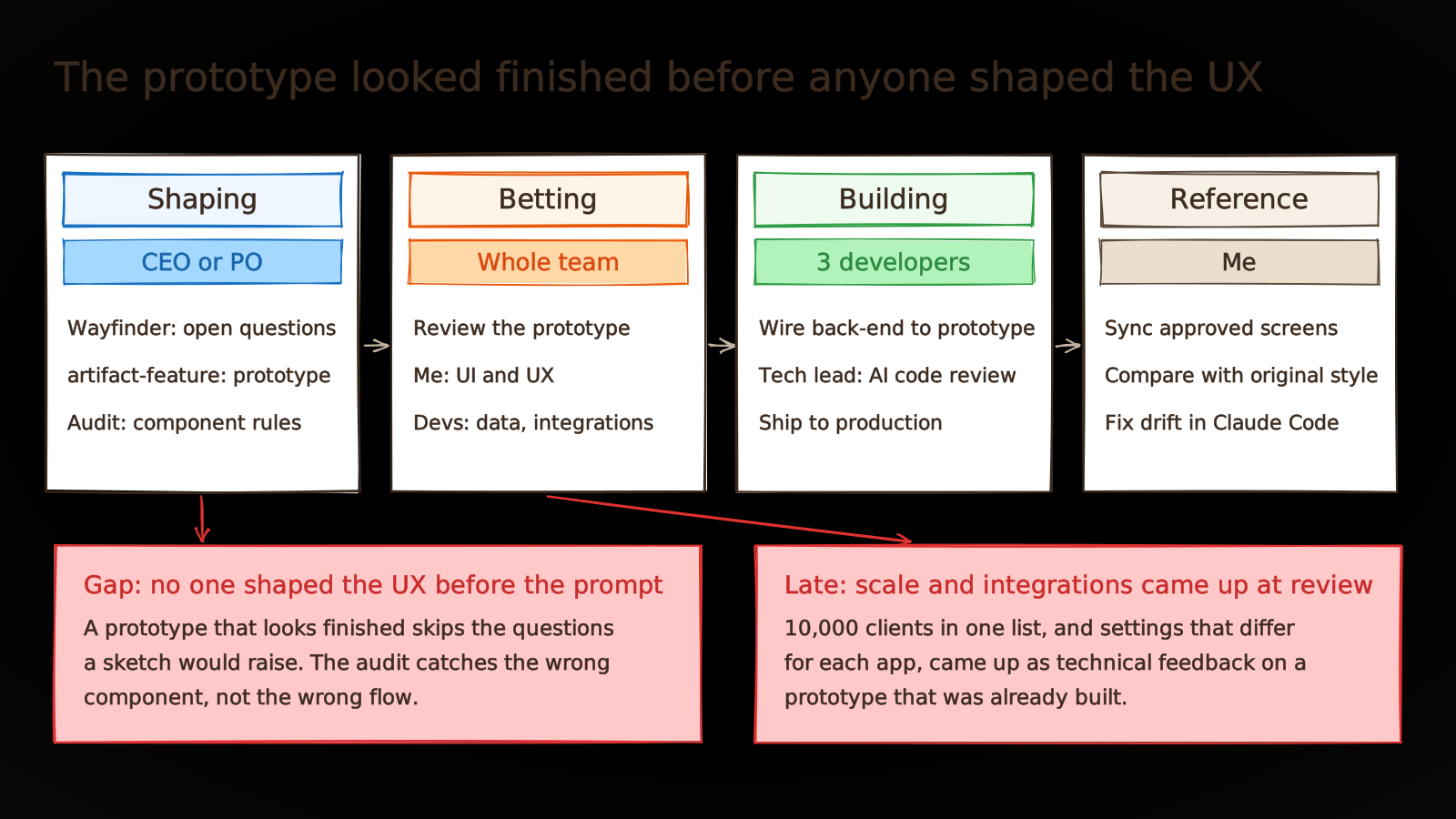
A feature started when the CEO or PO used Wayfinder to list the open questions, then ran artifact-feature to build a prototype as a Claude artifact. At betting, the whole team reviewed the prototype together: I looked at UI and UX, developers looked at data and integrations. Once approved, developers wired the back-end to the prototype and shipped it, with the code going through the tech lead’s AI review. Finally, I synced the approved screens from Claude Code to Figma to keep them for later comparison.
Trying it on the first features
In Australia, what an accounting firm knows about one client is spread across many apps. The books are in Xero or MYOB. Workflow and documents sit in practice management software such as FYI or Xero Practice Manager. Lodgments and tax notices are in the ATO’s online services for agents, signed letters in an e-signing app, call notes in OneNote, and workpapers in Excel, Word and PDF. To get the full picture of one client, an accountant has to open several of them in turn.
The CEO’s idea was that opening a client in AccountKit would show everything about them in one place, pulled from the apps the firm already uses. The CEO built this client page as a prototype with artifact-feature and shared it with the team. After review, the feature was built and shipped.
In practice the process ran smoothly. The CEO and PO were already comfortable with technical work and Claude Code, so it did not take them long to build prototypes on their own. Ideas reached the team as something to click through, not something to picture from a description. Approved prototypes were not thrown away either: developers wired the back-end to the same front-end and released it to production. Over six months, the whole team learned to work with AI at every stage, from product ideas to design to code review.
Figma stopped being where I spent my day
After the pitching stage, Figma was no longer where I designed. I used it to place approved prototypes next to the original style the CEO had signed off, and one look showed where the AI output had drifted. When it had, I fixed it directly in Claude Code rather than screen by screen in Figma. Fixing it there and syncing to Storybook meant later prototypes made fewer of the same mistakes.
AI gets it wrong even with clear instructions
Every component in Storybook had a guidelines.md, and AI still used components the wrong way. It could read the guidelines, but nothing made it follow them.
So I turned the component rules into an audit step inside artifact-feature. Every prototype is checked against them once it is built. Paraphrased, the skill works from three rules:
- Build only from Storybook. Use the components and tokens that exist there.
- Follow each component’s guidelines. Its
guidelines.mdsays when to use it and when not to. - Audit before handing over. Check each generated screen against those guidelines and report what breaks them.
The audit has limits too. It catches the wrong component, not the wrong flow. Someone who understands UI and UX still has to look at the prototype, which is why I kept that role in every team review.
Problems still to solve
Looking back, the biggest gap in the process was not at the review but before it, when the CEO started writing the prompt. A prototype that looks finished lets everyone skip the questions a rough sketch would have raised. On the client page, most review feedback came from engineering: how does the list read when the system pulls in 10,000 clients, and how do you show integrations that are each configured differently, which the prototype could not. Those questions only came up once the prototype was built, and by then they were treated as technical problems. Nobody gave the CEO product or UX input before the prompt, and the process never said what a complete prototype needs to cover.
What I learned
If I did it again, I would not stop at teaching the team the tools, because workshops and demo videos about the skill were not enough. I would set a definition of ready for prototypes: before review, a prototype has to show the happy flow, edge cases such as empty data, very large data or a failed integration, and its validation cases. Alongside that, I would add a short UX consult during shaping, so those questions get asked before the CEO starts prompting.
A prototype let the CEO show the team an idea instead of describing it, and that was the biggest change this process brought. But finishing a feature, in UX and in engineering, still takes the people who do that work.
Try this workflow (free)
AccountKit’s design system and prompts belong to the company, so I cannot share them here. The same workflow runs on Zweihänder, my open-source design system. Its Storybook is the component source a prototype is built from.
About the visuals
The diagrams are simplified reconstructions. AccountKit’s screens, data and internal rules are left out.